

Why Your eCommerce Checkout Could Be Losing Sales
Getting customers to visit your online store is only half the battle.
You might be investing in SEO, Google Ads, social media marketing and email campaigns to attract visitors to your website.
Your products might be competitively priced, your website might look professional, and customers could be adding items to their baskets.
But what happens when they reach the checkout?
For many eCommerce businesses, this is where potential sales are lost.
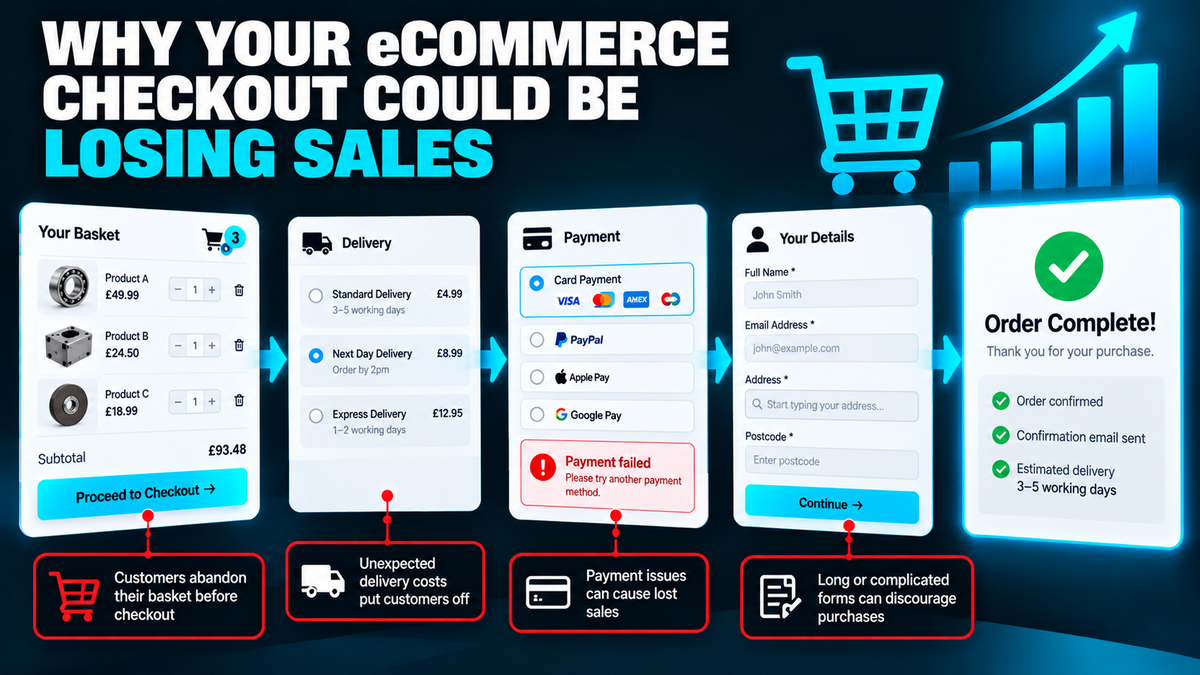
Customers might abandon their purchases because the checkout is too complicated, delivery costs are unexpected, payment options are limited or the website doesn't inspire confidence.
The frustrating part is that you've already done much of the hard work to attract those customers.
Improving your checkout experience could help you generate more sales from the visitors you're already receiving.
In this guide, we'll explore the most common reasons customers abandon their baskets and explain how to improve your eCommerce checkout to increase conversions.
1. What Is Checkout Abandonment?
Checkout abandonment happens when someone begins the checkout process but leaves without completing their purchase.
It's slightly different from basket abandonment, which refers to customers adding products to their basket but not completing an order, regardless of whether they started checkout.
For example, imagine your online store receives 1,000 visitors who add products to their baskets.
Of those customers, 300 complete their purchases.
That means 700 baskets didn't result in an order.
Your basket abandonment rate would be 70%.
However, this doesn't necessarily mean your checkout is responsible for every lost sale.
Some customers use shopping baskets to compare prices, save products or calculate delivery costs without intending to purchase immediately.
The important thing is to identify which customers are genuinely trying to buy and what might be preventing them from completing their orders.
2. Unexpected Delivery Costs
One of the biggest frustrations for online shoppers is discovering additional costs at the final stage of checkout.
For example, a customer might find a product advertised at £49.99.
They add it to their basket, proceed to checkout and discover an additional £12.95 delivery charge.
Suddenly, the product doesn't seem quite as attractive.
This can be particularly problematic when competitors provide clearer delivery pricing.
How to improve it
Display delivery information as early as possible.
Depending on your business, this might include:
Delivery prices on product pages
Clear free-delivery thresholds
Estimated delivery costs in the basket
Delivery information pages
Accurate delivery timescales
For B2B suppliers, delivery charges may depend on product weight, pallet quantities or geographic location.
In these situations, explaining how delivery is calculated can help customers understand what to expect.
Our advice: Avoid surprising customers with additional costs at the final stage of checkout.
3. Forcing Customers to Create an Account
Requiring customers to register before purchasing can create unnecessary friction.
Some shoppers simply want to order a product quickly.
They may not want to create a password, verify an email address or complete additional registration steps.
If your website forces account creation, some customers may abandon their purchase rather than continue.
How to improve it
Consider offering guest checkout for customers who don't need an account.
You can still provide the option to create an account after completing a purchase.
For WooCommerce websites, guest checkout and account registration options can be configured according to the business's requirements.
However, some B2B stores genuinely require approved trade accounts or customer-specific pricing.
In these situations, account registration may be necessary.
The key is to make the process straightforward and clearly explain why registration is required.
4. Too Many Checkout Form Fields
Long checkout forms can discourage customers from completing purchases.
Imagine someone buying a small product but being asked to complete several pages of unnecessary information.
The more complicated the process becomes, the greater the opportunity for frustration.
Common problems include:
- Too many mandatory fields
- Repeated requests for information
- Unclear field labels
- Complicated address forms
- Unnecessary company information
- Confusing error messages
How to improve it
Only request information genuinely needed to process the order.
For example, a standard retail checkout might require:
- Customer name
- Email address
- Delivery address
- Billing details where necessary
- Payment information
Additional information should only be requested where it serves a clear purpose.
For B2B businesses, company names, VAT information or purchase order references may be important.
However, these fields should be relevant to the customer and the order.
5. Limited Payment Options
Customers have different payment preferences.
Some prefer debit or credit cards, while others use digital wallets such as Apple Pay or Google Pay.
If your checkout doesn't support a customer's preferred payment method, they may decide to purchase elsewhere.
How to improve it
Review the payment methods available on your website.
Depending on your customers and payment provider, options might include:
- Debit and credit cards
- Apple Pay
- Google Pay
- PayPal
- Bank transfer
- Approved trade credit accounts
Not every payment method is appropriate for every business.
For example, a B2B wholesaler may need to offer purchase orders and agreed payment terms rather than immediate card payments.
The objective is to provide convenient, reliable payment options that suit your customers.
6. A Checkout That Doesn't Work Properly on Mobile
A website might look excellent on a desktop computer but provide a frustrating experience on a smartphone.
Small form fields, awkward layouts and difficult payment screens can make mobile checkout unnecessarily complicated.
Customers may also struggle with:
- Buttons that are difficult to tap
- Poorly positioned form labels
- Excessive scrolling
- Slow-loading pages
- Payment windows that don't display correctly
- Confusing navigation
How to improve it
Test the complete checkout process on different mobile devices.
Don't simply check whether the page looks responsive.
Try completing a genuine test order.
Make sure customers can enter their details, select delivery options and complete payment without difficulty.
For WooCommerce stores, mobile checkout testing should form part of regular website quality assurance.
7. Slow Checkout Pages
Website speed can affect the shopping experience.
If checkout pages take too long to load, customers may become frustrated or lose confidence in the website.
Slow performance can be caused by several factors, including:
- Poor hosting
- Excessive plugins
- Unnecessary scripts
- Inefficient custom functionality
- Slow third-party integrations
- Payment gateway delays
- Incorrect caching configurations
WooCommerce checkout pages require particular care because they handle dynamic customer and order information.
How to improve it
Review the performance of your checkout and basket pages.
Make sure your hosting environment is suitable for your website's traffic and functionality.
It's also important to check that caching and optimisation settings don't interfere with checkout sessions or payment processing.
A fast checkout is useful, but it must also be reliable.
8. Customers Don't Trust the Website
Customers need confidence before entering personal information and payment details.
If your website looks outdated, displays errors or provides little information about the business, potential customers may hesitate.
This is particularly important when someone is purchasing from your company for the first time.
How to improve it
Build trust throughout the shopping experience.
Useful elements include:
Clear company contact information
Professional website design
Genuine customer reviews
Accessible delivery information
Clear returns and refund policies
Recognisable payment methods
Accurate product descriptions
Secure HTTPS connections
Avoid cluttering the checkout with unnecessary badges or claims.
The objective is to provide clear, credible information that reassures customers.
9. Complicated Delivery Options
Delivery is often more complicated for eCommerce businesses than it first appears.
For example, a customer might purchase several products with different delivery requirements.
Some items may be available for next-day delivery, while others require specialist shipping.
For B2B suppliers, delivery may involve pallets, oversized products or collection arrangements.
If customers can't understand their delivery options, they may abandon their purchase.
How to improve it
Provide clear delivery choices with accurate pricing and timescales.
Where possible, explain:
- Available delivery services
- Estimated delivery dates
- Collection options
- Shipping restrictions
- Additional charges
- What happens when products are out of stock
For more complex WooCommerce websites, bespoke delivery calculations may be required.
10. Discount Codes That Cause Frustration
Discount code fields can create an unexpected problem.
If customers see a prominent promotional code box during checkout, they may leave your website to search for a discount.
They might then become distracted, discover a competitor or simply fail to return.
How to improve it
If discount codes are an important part of your marketing, keep the functionality available.
However, consider whether the field needs to be one of the most prominent elements on the checkout page.
You could use a smaller expandable section for promotional codes.
The objective is to avoid unnecessarily distracting customers who are already ready to purchase.
11. Confusing Checkout Errors
Few things are more frustrating than completing a checkout form only to receive an unclear error message.
For example:
"Transaction failed."
This doesn't explain what went wrong or what the customer should do next.
Other common problems include:
- Address validation errors
- Incorrect postcode handling
- Payment gateway failures
- Mandatory fields that aren't clearly identified
- Orders appearing to fail after payment
- Repeated payment attempts
How to improve it
Make error messages clear and helpful.
For example:
"Please check your postcode and try again."
Or:
"Your payment couldn't be completed. Please try another payment method or contact us for assistance."
You should also monitor technical errors and investigate recurring payment failures.
A checkout that appears to work during basic testing may still experience problems with particular devices, payment methods or customer details.
12. Not Showing the Final Order Clearly
Before completing a purchase, customers want to understand exactly what they're paying for.
If the final order summary is confusing, they may hesitate.
A good checkout should clearly display:
- Products being purchased
- Quantities
- Product prices
- Discounts
- Delivery charges
- VAT or other applicable taxes
- Final order total
For UK B2B eCommerce websites, VAT presentation can be particularly important.
Trade customers may expect to see prices excluding VAT, while consumer customers need clear and compliant pricing information.
Your website should present pricing accurately and consistently for the audience you're serving.
13. Stock Availability Problems
Customers can become frustrated when products appear available but are later shown as out of stock.
This can happen when inventory isn't updated accurately.
For example, a product might display as available on the product page but become unavailable during checkout.
For businesses selling through multiple channels, stock synchronisation can be particularly important.
How to improve it
Make sure your stock management processes are reliable.
Depending on your business, this might involve:
- WooCommerce inventory management
- Automatic stock updates
- ERP integration
- Warehouse management integration
- Clear stock availability messages
- Accurate backorder settings
For businesses using external stock management software, connecting WooCommerce to the existing system can help reduce discrepancies.
14. Not Following Up on Abandoned Baskets
Not every abandoned basket represents a permanently lost sale.
Some customers may simply need more time before purchasing.
Where you have the necessary customer information and a lawful basis for contacting them, abandoned basket reminders can provide an opportunity to recover sales.
For example, a customer might receive an email reminding them that they haven't completed their purchase.
However, abandoned basket marketing must comply with applicable UK data protection and electronic marketing rules.
You shouldn't assume that beginning checkout automatically gives you permission to send promotional emails.
How to improve it
Consider a properly configured abandoned basket recovery process.
This might include:
- Appropriate email consent or another applicable lawful route
- A clear reminder of the products left behind
- A link back to the basket
- Helpful customer support information
- Sensible message frequency
Avoid sending excessive reminders or creating unnecessary pressure.
15. Track Where Customers Leave Your Checkout
One of the most useful ways to improve checkout performance is to understand where customers abandon the process.
Google Analytics 4 can help track important eCommerce events, including:
view_itemadd_to_cartbegin_checkoutadd_shipping_infoadd_payment_infopurchase
When implemented correctly, these events can help you understand how customers move through the buying process.
For example, you might discover that a large proportion of customers abandon checkout after delivery costs are displayed.
Alternatively, customers may reach the payment stage but fail to complete their orders.
This information can help identify where further investigation is needed.
However, analytics events must be configured and tested properly.
Missing or duplicated tracking events can lead to misleading conclusions.
16. How Much Difference Could Checkout Improvements Make?
Even a relatively small increase in completed orders can have a meaningful commercial impact.
Consider this hypothetical example:
| Measurement | Before Improvements | After Improvements |
|---|---|---|
| Monthly checkout starts | 1,000 | 1,000 |
| Completed orders | 350 | 420 |
| Checkout completion rate | 35% | 42% |
| Average order value | £100 | £100 |
| Monthly revenue | £35,000 | £42,000 |
These figures are illustrative and aren't a prediction of results.
In this example, the business generates an additional £7,000 in monthly revenue without increasing the number of customers starting checkout.
That's a 20% increase in revenue from the same checkout traffic.
This demonstrates why improving your existing website can sometimes be more valuable than simply increasing advertising spend.
17. Test Checkout Changes Before Making Major Decisions
It's tempting to assume that a particular checkout design will always perform better.
However, customer behaviour varies between industries, products and audiences.
For example, a simplified checkout might improve performance for a consumer retailer.
A B2B supplier, on the other hand, may need additional fields for company information, purchase order numbers or delivery instructions.
Rather than making major changes based entirely on assumptions, review your analytics and customer feedback.
Where traffic volumes allow, controlled A/B testing can help compare different approaches.
You should also monitor payment failures, customer support enquiries and completed orders.
The objective is to identify improvements that genuinely help customers complete purchases.
eCommerce Checkout Optimisation Checklist
If your online store is generating traffic but not enough sales, review the following:
| Area | What to Check |
|---|---|
| Delivery costs | Are charges clear before checkout? |
| Guest checkout | Can customers purchase without unnecessary registration? |
| Checkout forms | Are fields relevant and easy to complete? |
| Payment methods | Are suitable payment options available? |
| Mobile usability | Does checkout work smoothly on smartphones? |
| Website speed | Are basket and checkout pages responsive? |
| Trust signals | Does the website inspire confidence? |
| Delivery options | Are timescales and charges easy to understand? |
| Discount codes | Are promotional fields causing distractions? |
| Error messages | Are problems explained clearly? |
| Order summary | Are prices, VAT and totals accurate? |
| Stock availability | Is inventory information reliable? |
| Basket recovery | Are follow-up messages appropriate and compliant? |
| Conversion tracking | Can you identify where customers abandon checkout? |
| Testing | Are checkout changes reviewed before and after launch? |
How West Midlands Media Helps Improve eCommerce Websites
At West Midlands Media, we've been helping businesses improve their websites and digital marketing since 2006.
Based in Wolverhampton, we work with businesses across the West Midlands and throughout the UK.
We specialise in bespoke WordPress and WooCommerce development, SEO, Google Ads and ongoing website support.
Our WooCommerce projects range from straightforward online stores to more complex B2B eCommerce websites with trade accounts, specialist pricing, custom delivery requirements and external system integrations.
We understand that a successful eCommerce website needs to do more than attract visitors.
It needs to make it easy for customers to find products, understand pricing and complete purchases.
By combining bespoke website development with digital marketing expertise, we can help businesses identify opportunities to improve the customer journey and increase conversions.
Is Your eCommerce Checkout Costing You Sales?
If customers are adding products to their baskets but failing to complete their purchases, there may be opportunities to improve your website.
Unexpected delivery charges, complicated forms, slow-loading pages or technical checkout issues could all be contributing to lost sales.
Sometimes relatively straightforward changes can make a meaningful difference.
West Midlands Media offers a free website and digital marketing review to help identify opportunities for improvement.
We'll review your current website, highlight potential issues and provide practical recommendations.
Contact West Midlands Media today to discuss how your eCommerce website could convert more visitors into paying customers.